TikTok Content Suite AI Search: Turning Organic UGC About Your Brand Into Ads
What AI Search actually finds
Most sellers have lived some version of this: orders jump for a day, and after a lot of digging you discover a creator you have never spoken to posted a video featuring your product. Organic mentions like that often convert better than anything your own team produces, but you only benefit if you find them while they are still warm.
Manual search does a poor job here. Keyword search on TikTok surfaces videos with your brand in the caption or hashtags. If a creator only says your brand name out loud, or the product label just appears on screen for a few seconds, keyword search misses it entirely.
Content Suite, which TikTok rolled out around TikTok World in June 2026, targets exactly that gap. Its AI Search runs on Symphony Agent and scans organic videos through three channels: caption text, ASR speech recognition, and OCR for on-screen text. The output is a library of creator content about your brand, including mentions you would never have found by hand. One caveat before you plan around it: the feature is currently limited to select customers, with wider access rolling out over time. If you do not see it, ask your rep or agency about the allowlist.
Make your brand easy to detect
AI Search can only match what it can recognize, and most of what it recognizes comes from inputs you control. A few things are worth fixing before you even get access.
Brand name consistency comes first. If your brand appears under three different spellings across your storefront, product titles, official account, and creator briefs, ASR and OCR will catch some mentions and miss others. Pick one canonical spelling, use it everywhere, and coach creators to pronounce it the same way.
Hashtag hygiene matters for the same reason. When you send samples, give creators one branded hashtag and one product-line hashtag in the brief instead of letting a dozen variants bloom. To the machine, hashtags are retrieval anchors rather than decoration.
Product naming is the third lever. A name stuffed with model numbers and qualifiers never gets spoken in full, so speech recognition has nothing to latch onto. Short, pronounceable product names get said out loud, and mentions that get said out loud get found.
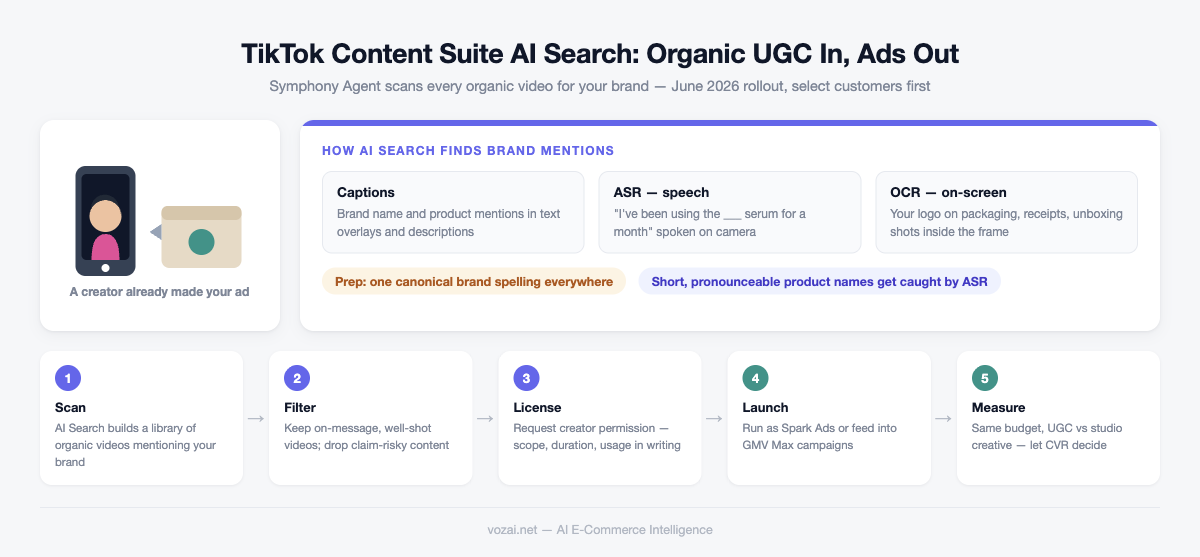
The workflow from discovery to live ads
The full pipeline is five steps, and each one lives in a different part of the interface.
| Step | Action | Tool surface |
|---|---|---|
| 1. Scan | Search organic videos by brand and product names | AI Search inside Content Suite |
| 2. Shortlist | Filter finds for quality and brand fit, save to library | Content Suite creator content library |
| 3. License | Request usage permission, agree on scope and duration | Content Suite permission request |
| 4. Launch | Run approved videos as Spark Ads or feed them into GMV Max | TikTok Ads Manager / GMV Max |
| 5. Review | Compare UGC performance against studio creative | Ads Manager reporting |
Be selective at step 2. Start with 10 to 20 videos that actually fit your brand and expand once you see results. AI Search judges whether a video mentions you, not whether it should represent you. A blurry clip with mumbled audio belongs outside your library even if the scan returns fifty like it, and so does anything filmed for an audience that is not yours.
Step 3 is where pipelines stall in practice: creators who never reply, asks that make no sense, licenses capped at 30 days. It deserves its own section.
Licensing is the step that takes real work
AI Search automates discovery, not negotiation. Getting a video into an ad still requires the creator to grant authorization, the same mechanism as a classic Spark Ads code. Content Suite finds the person; the deal is on you.
Put three terms in writing: usage (run as-is only, or re-editing allowed), duration (30 versus 90 days), and channel scope (TikTok only or wider). Creator authorizations expire, and when they do the ad stops. Align your flighting with the license window so a campaign that is scaling does not die mid-flight because the clock ran out.
On price, licensing an existing organic video usually costs less than commissioning new content, since the creator has zero marginal cost. If one video performs unusually well and the creator prices accordingly, negotiate a bundle across several of their videos, or move to the next candidate; AI Search rarely gives you only one option. Some content you should walk away from entirely: anything whose claims could breach ad policy, and any creator in the middle of a recent controversy. A competitor’s product in frame is also an automatic pass. Policy strikes from a licensed video land on your ad account, not the creator’s.
Does found UGC actually beat studio creative
Do not assume it does. Run a head-to-head test: same budget, same audience, same time window, one to two weeks, then compare CTR, CVR, and CPA against your existing studio assets.
The pattern I keep seeing is that organic UGC wins on front-end metrics like click-through and watch time, while studio creative often still closes better on higher-priced products where the pitch needs structure. The practical setup is a mixed pool rather than a winner-take-all switch, with the auction shifting spend toward whichever performs.
If you run GMV Max, the integration is simpler: drop licensed UGC into the asset pool and let the system handle combination testing. At that point the number to watch is overall ROI after the pool grew, not per-video stats. And since AI Search keeps scanning, revisit the library every week or two. Once your brand has any momentum, organic mentions keep arriving. The library is a feed, not a one-time excavation.
Related Articles
Google Ads Removes Language Targeting From Search Campaigns: A Cross-Border Audit
From late September 2026, Search campaigns and the Search Network portion of Performance Max lose the campaign-level language setting. Google now picks the ad language from your creative, landing page, search terms, and user signals. What that means for multi-language and multi-country accounts, and what to check in ad groups, landing pages, and API scripts.
It Is Not DSA Getting Auto-Upgraded to AI Max in September: It Is ACA and Broad Match
From September 2026, Search campaigns running automatically created assets or the campaign-level broad match setting are auto-upgraded to AI Max, with Google aiming to finish by the end of the month. The DSA upgrade slipped to February 2027. How to check scope in ten minutes and which controls survive.
TikTok Shop Native CRM: In-App Messaging to Retarget Past Buyers and Cart Abandoners
TikTok Shop launched a native CRM tool in 2026 that lets sellers send targeted messages to past buyers and cart abandoners directly in the app. Message open rates run 3-5x higher than email. Setup walkthrough and conversion benchmarks included.