Mailchimp's Claude Connector: Plan Campaigns and Pull Revenue Numbers From a Chat
What the connector actually does
On 2026-05-28 Mailchimp announced a batch of expanded integrations as part of its Analytics AI push, and a Claude connector was on the list alongside new Wix and WooCommerce integrations. The short version: you can query your own Mailchimp account from inside a Claude conversation, instead of exporting CSVs or pasting screenshots and hoping the model guesses well.
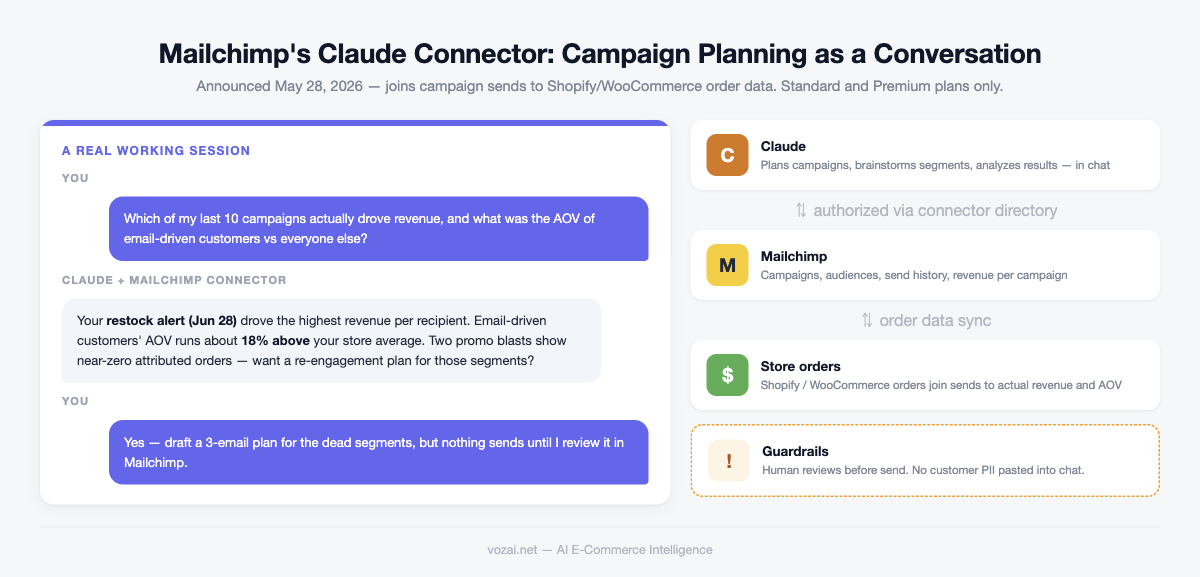
The part that matters for e-commerce teams is that the connector joins campaign sends with order data. Open and click rates were always visible in Mailchimp, but tying a specific send to actual dollars usually meant lining up order timestamps by hand. With the connector you can ask Claude for revenue per campaign, or the average order value of customers who came in through email, and it answers from your real account data.
One eligibility note before you get attached to the idea: the connector is available on Standard and Premium plans only. Free and Essentials accounts cannot connect. If you are already on Standard, this costs you nothing to try; if you would be upgrading just for this, read the prompt section first and decide whether the workflows justify it.
Setting it up from the Claude side
The connection flow is a standard authorization handshake. Open Claude’s connector directory (the MCP directory in settings), search for Mailchimp, click connect, and you are redirected to a Mailchimp authorization page. Sign in, approve the access, and the connector shows up as available in your conversations.
The account you authorize with defines what Claude can see, so treat that choice as a permissions decision rather than a formality. A team account limited to reports and audience viewing is a better authorization identity than the account owner. Narrower scope means a smaller blast radius when someone asks a question they should not.
Once connected, run a cheap verification before trusting anything: ask Claude to list your five most recent campaigns with send dates, and check them against the Mailchimp dashboard. Matching answers mean the connection works. Vague, generic marketing advice usually means the connector is not actually engaged and the model is answering from general knowledge. Connections are also per user. Each teammate using Claude authorizes separately.
Six prompts that pull real answers
These six cover the three jobs the connector is best at: campaign planning, segment brainstorming, and post-campaign revenue analysis.
| Prompt you type | What you get back |
|---|---|
| Rank my campaigns from the last three months by revenue | A revenue-ranked list showing which themes actually convert |
| How does average order value for email-driven customers compare to my overall AOV | A concrete AOV comparison for judging email’s real contribution |
| Draft a four-week email calendar for the run-up to Q4, based on my best-performing topics and send times | A week-by-week campaign plan grounded in your history |
| Suggest three customer segments worth a dedicated campaign, based on order data | Segment ideas plus what to send each group |
| Review last week’s product launch email: opens, clicks, orders, and revenue | A single-campaign recap with real numbers attached |
| Write a brief for a winback campaign targeting customers with two or more repeat purchases | A brief with subject line angles, cadence, and audience definition |
The pattern across all six: specificity wins. A vague ask like improve my email marketing gets you polished generalities, while a prompt with a time range and a stated reference point sends Claude to your actual data first. The recap prompts are the quiet time-savers. A month-end review that used to mean stitching together two dashboards becomes one question.
What it can and cannot see
Per Mailchimp’s own materials, the connector’s core is the join between campaign sends and order data. Campaign-level performance, revenue attributable to email, and the purchasing behavior of email-driven customers are squarely inside its view, and those are the questions it answers best.
Do not assume it sees everything else. Your ad platform data, on-site behavioral events, and records living in other CRM tools are outside this connector. Ask it about total marketing ROI and it can only reason from the email slice, so the answer will be structurally incomplete. The gap is a data boundary rather than a model failure.
The practical rule: treat Claude’s output as a fast analyst’s first draft scoped to email. Email campaign questions, ask freely; cross-channel conclusions, assemble yourself.
Two guardrails before you rely on it
First, everything that will reach a customer gets a human review before send. Claude’s campaign plans, subject lines, and briefs need a pass from a person before they are executed in Mailchimp. Metric interpretations occasionally drift, and copy can wander off brand voice. Both look fine in a chat window and become incidents in an inbox.
Second, never paste customer PII into the conversation. The connector reaches your data through an authorized channel; manually pasting customer emails or order exports into the chat bypasses that permission design entirely. If you need analysis on a customer group, let Claude query aggregates through the connector rather than feeding it a raw list.
Both rules sound obvious, and both are exactly what busy small teams skip under deadline pressure. Write them into your team’s operating checklist: who authorizes, who can query, who signs off before send. That is what turns the connector from a one-time experiment into a durable part of the workflow.
Related Articles
Klaviyo K:BOS 2026: Headless Opens 490 APIs to Claude and ChatGPT
At K:BOS 2026 on September 9-10 in Boston, Klaviyo launched Headless: more than 260 MCP tools and more than 490 APIs callable from Claude, ChatGPT or any AI system. Agents can read Klaviyo data, write to it, and put a campaign live without anyone opening the interface. SQL inside the Klaviyo Data Platform shipped as a preview. Here is what changes for a brand already running Klaviyo, and how to scope permissions before you connect anything.
Converting AI Search Referral Traffic to Email Subscribers: A Retention Playbook
ChatGPT now drives 20% of Walmart referral traffic and over 20% for Etsy. AI-referred visitors have high purchase intent but low brand awareness and rarely return organically. This guide covers email capture strategies, welcome sequences, and retention flows designed specifically for AI referral traffic.
Klaviyo vs Mailchimp vs Attentive 2026: Which One Is Right for Your DTC Cross-Border Brand
All three tools updated heavily in May-June 2026: Klaviyo launched Composer and Customer Agent, Mailchimp shipped Analytics AI and WooCommerce/Wix integration, Attentive released Brand Voice 2.0 and Reporting Agent. Comparison matrix from a DTC cross-border perspective with recommendations by brand GMV size.