How to Use AI for Amazon Listing Copy: Titles, Bullets, and Descriptions
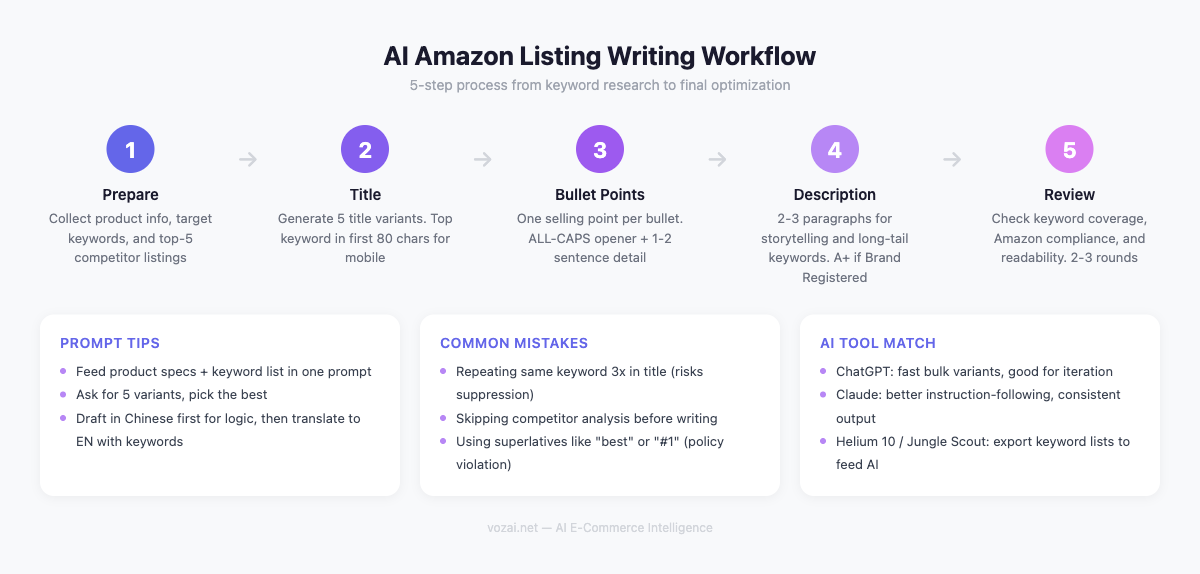
Why Amazon Listing Copy Is a Different Game
If you have written product copy for Shopify or your own website, Amazon will feel like a different planet. The A9 algorithm (and its successor, A10) decides whether shoppers ever see your product. Your listing copy is not just marketing material — it is the primary ranking signal for organic search within Amazon’s marketplace.
The tension is real: you need to pack in enough keywords for the algorithm, but the copy also needs to read well enough that a human actually clicks “Add to Cart.” Keyword-stuffed listings look spammy and tank conversion rates. Beautifully written copy without keyword strategy gets buried on page seven.
ChatGPT and Claude can handle both objectives at the same time — you give them the keywords and the product info, and they produce copy that reads like a human wrote it while covering the keyword footprint you need.
Step 1: Gather Product Info and Keywords
Before you open any AI tool, do the groundwork. You need three things:
Product details. Core features, dimensions, materials, use cases, and what makes your product different from the ten competitors sitting next to it in search results.
Target keywords. Use Helium 10, Jungle Scout, or even Amazon’s own search autocomplete to pull a list of 15-25 relevant keywords. Separate them into primary keywords (high volume, must appear in the title) and secondary keywords (lower volume, distribute across bullets and description).
Competitor intel. Pull up the top three listings for your main keyword. Note their title structure, which benefits they emphasize in bullets, and what their descriptions look like. You are not copying them — you are understanding what the market expects.
Organize all of this in a simple document. The more structured your input, the better your AI output will be.
Step 2: Generate the Title with AI
Amazon titles are the single most important ranking factor. Most categories allow 150-200 characters, though some are capped at 80. Check your category’s style guide before writing.
A strong Amazon title typically follows this pattern: Brand + Primary Keyword + Key Feature + Size/Quantity + Secondary Keyword. Front-load your highest-volume keyword as close to the beginning as possible.
Here is a prompt template that works well:
You are an experienced Amazon listing copywriter who understands A10 algorithm optimization. Write 5 Amazon product title variations for the following product. Each title should be under [CHARACTER LIMIT] characters, place the primary keyword within the first 80 characters, and read naturally without keyword stuffing. Use pipes or dashes as separators where appropriate.
Product: [PRODUCT NAME AND DETAILS] Brand: [BRAND NAME] Primary keywords: [LIST] Secondary keywords to include if space allows: [LIST] Category style guide notes: [ANY RESTRICTIONS]
Run this prompt, then evaluate the output against three criteria: Does the primary keyword appear early? Does it read like something a real brand would publish? Is it within the character limit?
Step 3: Write Bullet Points
Amazon gives you five bullet points (called “Key Product Features”), and each one should focus on a single benefit or selling angle. Do not cram multiple ideas into one bullet.
The structure that converts best: lead with the benefit in caps or bold phrasing, then follow with supporting detail. Think “BENEFIT — how and why” rather than a list of raw specifications.
Use this prompt:
Write 5 Amazon bullet points for the product below. Each bullet should lead with a clear customer benefit in capital letters, followed by a supporting explanation in 1-2 sentences. Naturally incorporate the secondary keywords listed. Each bullet should be under 200 characters. Cover these angles: primary use case, quality/materials, convenience, versatility, and guarantee/trust.
Product: [DETAILS] Target customer: [PROFILE] Secondary keywords to weave in: [LIST] Competitor weak points to address: [NOTES FROM YOUR RESEARCH]
The last line is where AI really helps. If competitor reviews complain about durability, have AI emphasize your product’s build quality. Turn competitor weaknesses into your bullet point advantages.
Step 4: Create the Product Description
The product description is where you have room to breathe. If you have A+ Content access (Brand Registry), you will design that separately — but the standard description field still matters for indexing and for mobile shoppers who scroll past the bullets.
This is where long-tail keywords earn their keep. Your title and bullets handle the high-volume terms. The description is the place to work in longer, more specific phrases that shoppers use when they know exactly what they want.
Try this prompt:
Write an Amazon product description (150-200 words) for the following product. Use a conversational but professional tone. Incorporate these long-tail keywords naturally: [LIST]. Structure the description as a short narrative: open with the problem the product solves, introduce the product as the solution, highlight 2-3 key differentiators, and close with a confidence-building statement. Do not use HTML tags. Do not use prohibited claims (medical, guaranteed results, etc.).
Product: [DETAILS] Target customer: [PROFILE] Brand voice: [GUIDELINES]
The explicit instruction about prohibited claims matters. Amazon’s Terms of Service restrict certain language — words like “guaranteed,” health claims, and superlatives like “best” or “#1” can get your listing flagged or suppressed. Including this guardrail in your prompt saves you from having to catch these issues in review.
Step 5: Review and Optimize
AI output needs a human pass before it goes live.
Keyword coverage check. Compare the final copy against your keyword list. Every primary keyword should appear at least once across the listing. Secondary keywords should appear where they fit naturally — do not force them.
Compliance scan. Read through the listing looking for Amazon TOS violations: unsubstantiated claims, competitor brand mentions, promotional language like “limited time offer” or “free shipping,” and any all-caps text beyond bullet point lead-ins.
Readability pass. Read the title, bullets, and description as if you were a shopper who has never seen this product. Does each element make sense on its own? Would you click? Would you buy?
Mobile preview. Amazon truncates titles and bullets on mobile. Check that your most important information appears within the visible portion on a phone screen.
Common Mistakes to Avoid
Keyword stuffing. Repeating the same keyword five times in a title does not help your ranking — it hurts readability and can trigger Amazon’s spam filters. Use a keyword once in the title, once in bullets, and variations in the description.
Ignoring backend search terms. Amazon provides a backend keyword field (250 bytes) that shoppers never see. Use it for misspellings, synonyms, and Spanish translations of your keywords. Do not waste valuable title or bullet space on terms that belong in the backend.
Copy-pasting AI output without editing. AI will occasionally produce generic phrases like “perfect for everyday use” or “ideal gift for any occasion.” These add nothing. Replace them with specific, concrete statements about your product.
Skipping competitor research. The prompt templates above work much better when you feed them real competitor data. Ten minutes pulling apart the top 3 listings will noticeably sharpen what the AI gives you back.
Tips for Ongoing Optimization
Start by generating three to five complete listing variations and running them through Amazon’s Manage Your Experiments (if eligible) or tracking keyword rankings and conversion rates after each update.
Feed performance data back into your prompts. If a particular bullet point angle is driving higher conversion, tell the AI to lean harder on that angle next time.
Revisit your listings quarterly. Search behavior shifts, competitors update their copy, and Amazon occasionally changes its style guide. A listing that ranked well six months ago may need a refresh. With your prompt templates saved, regenerating updated copy takes minutes.
Related Articles
Google Ads Removes Language Targeting From Search Campaigns: A Cross-Border Audit
From late September 2026, Search campaigns and the Search Network portion of Performance Max lose the campaign-level language setting. Google now picks the ad language from your creative, landing page, search terms, and user signals. What that means for multi-language and multi-country accounts, and what to check in ad groups, landing pages, and API scripts.
It Is Not DSA Getting Auto-Upgraded to AI Max in September: It Is ACA and Broad Match
From September 2026, Search campaigns running automatically created assets or the campaign-level broad match setting are auto-upgraded to AI Max, with Google aiming to finish by the end of the month. The DSA upgrade slipped to February 2027. How to check scope in ten minutes and which controls survive.
Amazon Seller Assistant in Claude: A Setup Guide for US Sellers
Amazon announced the Selling Partner plugin at Accelerate on September 23, 2026, bringing Seller Assistant into Amazon Quick and Claude. What it can read and change, the three always-on workflows to set up first, and the limits: no ads, one account at a time, US stores only.